Count every touch,see every rhythm.
Prop up your phone, press start and juggle. TouchTally counts each touch with the camera, shows your rhythm live and replays it in slow motion. It counts jump rope, push-ups and squats too — all on your phone.
Free to download. No account. Video stays on your phone.
Was that 40 touchesor 44?
For players, parents and coaches who want an honest count and a record that keeps going up — without someone standing there counting out loud.
Features
A counter, a coachand a slow-motion replay.
-
Counts with the camera
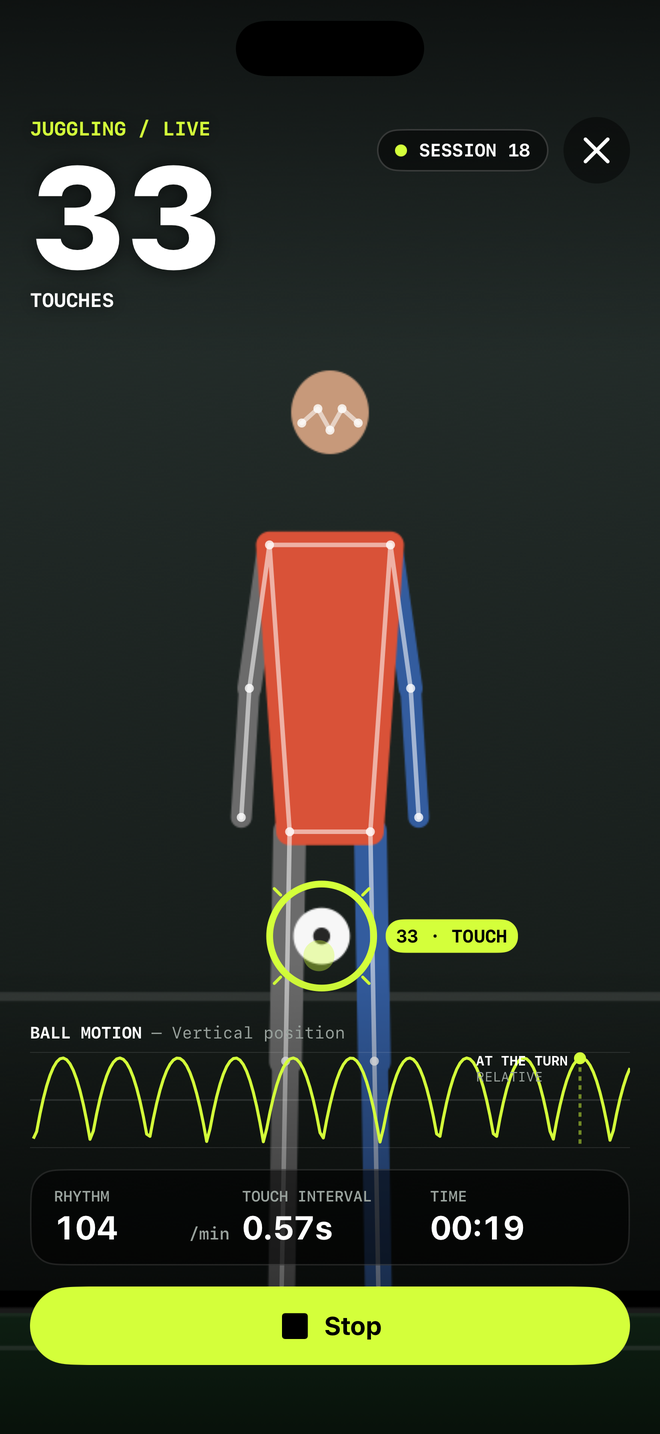
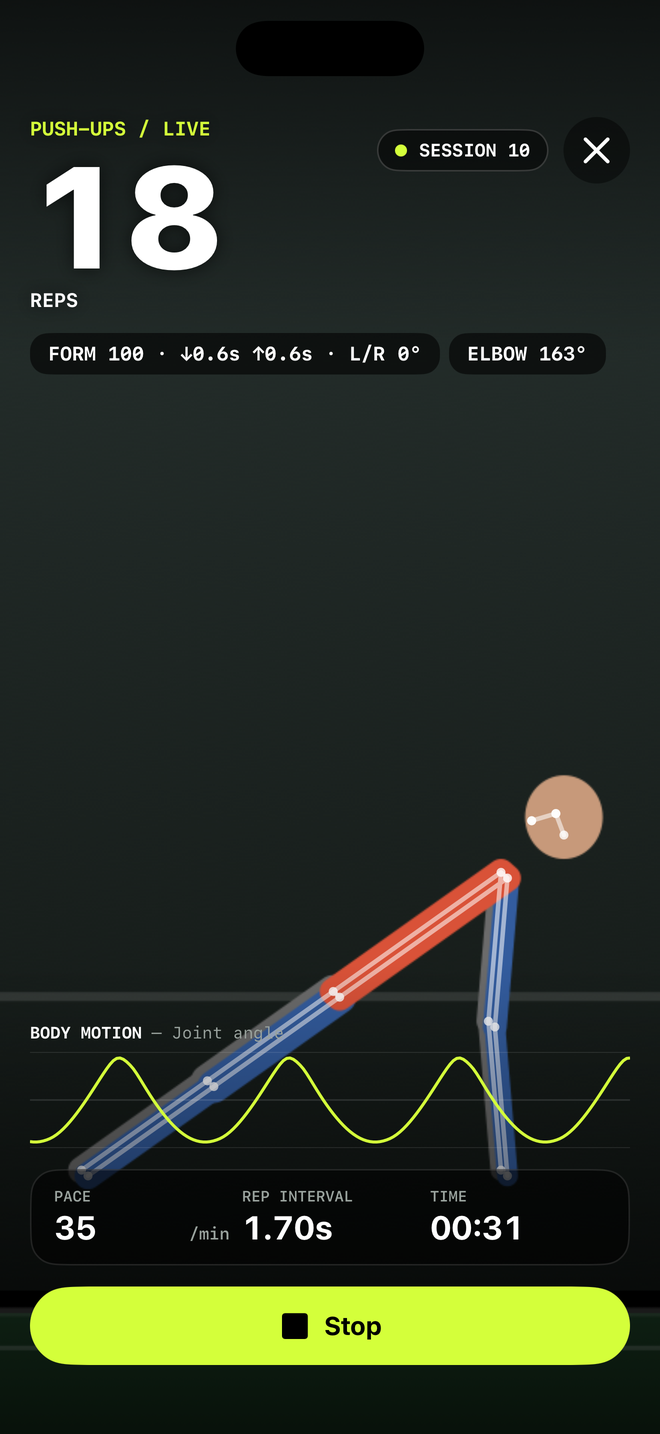
Prop up your phone and play. TouchTally follows your body and the ball and counts every touch live, with a big number you can read from across the yard.
-
Rhythm, not just a number
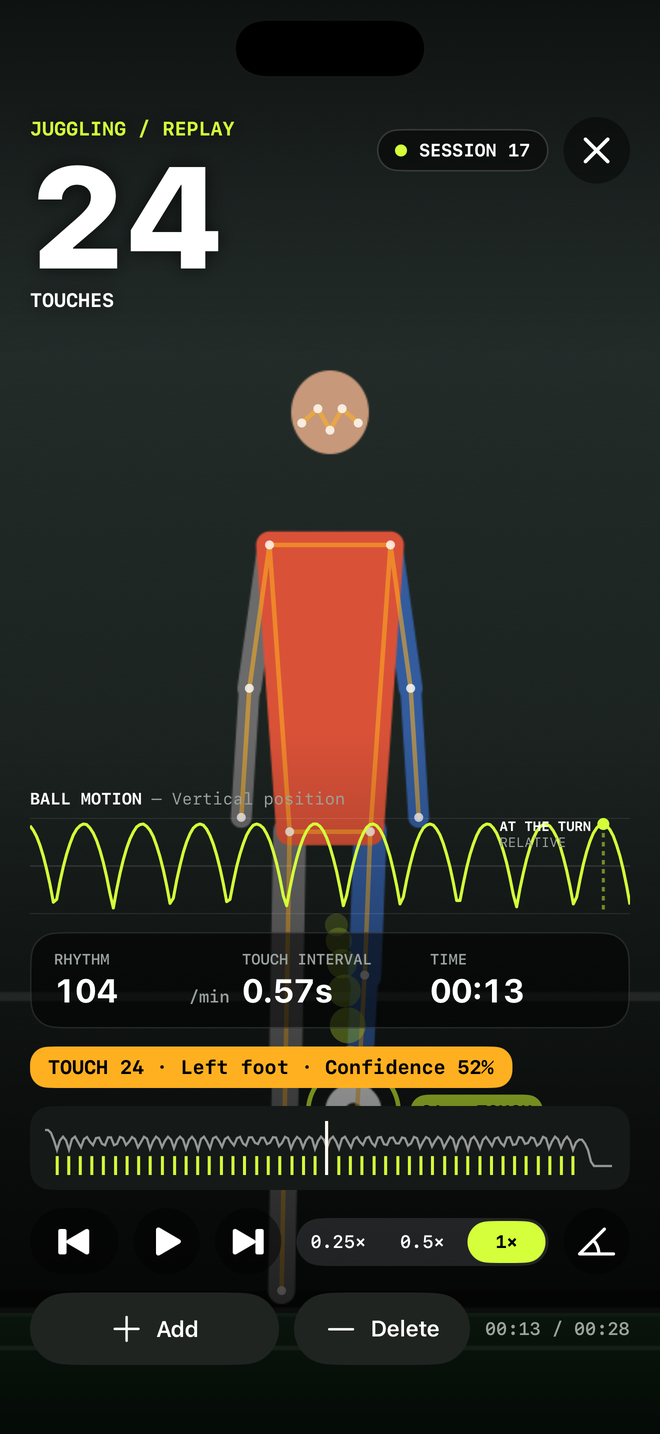
See your touches per minute, the time between touches and the ball’s height on a live chart, and hear a call-out at each milestone.
-
Replay in slow motion
Step through a session at 0.25×, 0.5× or 1×, see each touch marked, and with Pro fix a miscount with Add or Delete.
-
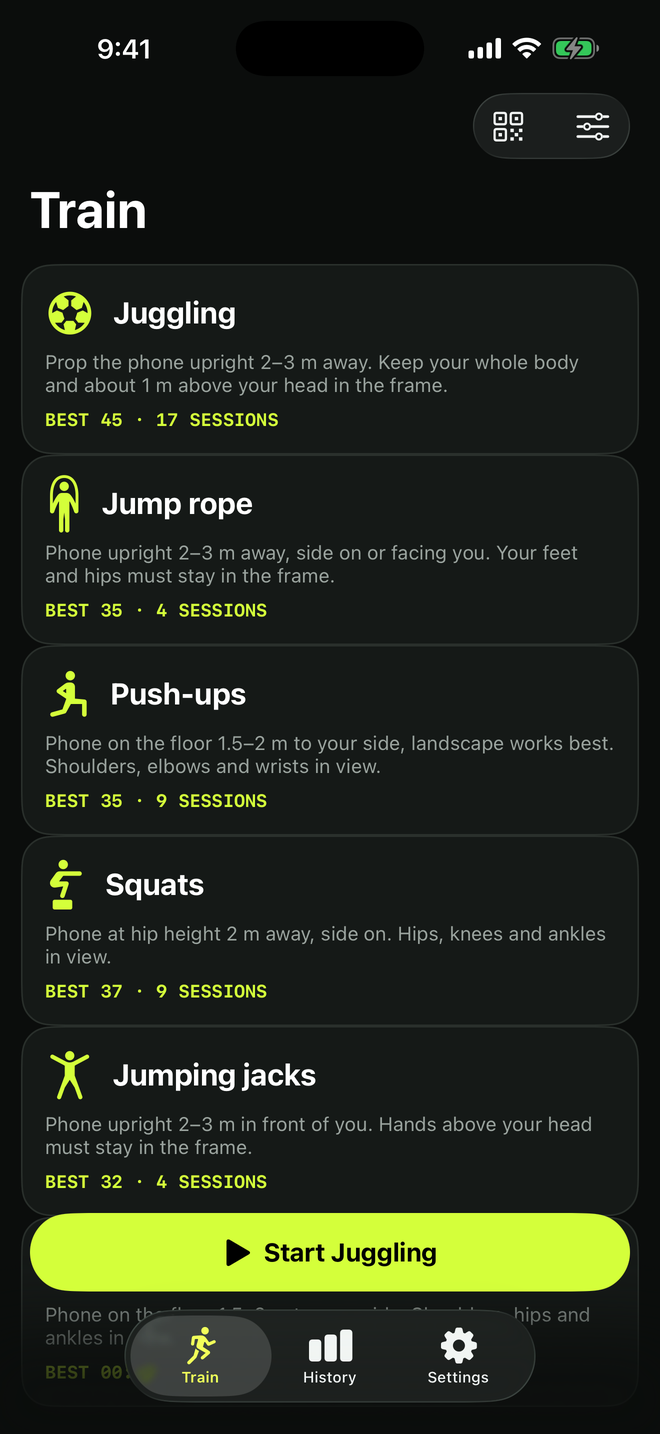
More than juggling
Jump rope (by camera or by the sound of the rope), push-ups and squats are free. Pro adds jumping jacks and a plank timer. On iPhone, add dribbling, volley keep-ups, racket bounces and more.
-
Records and streaks
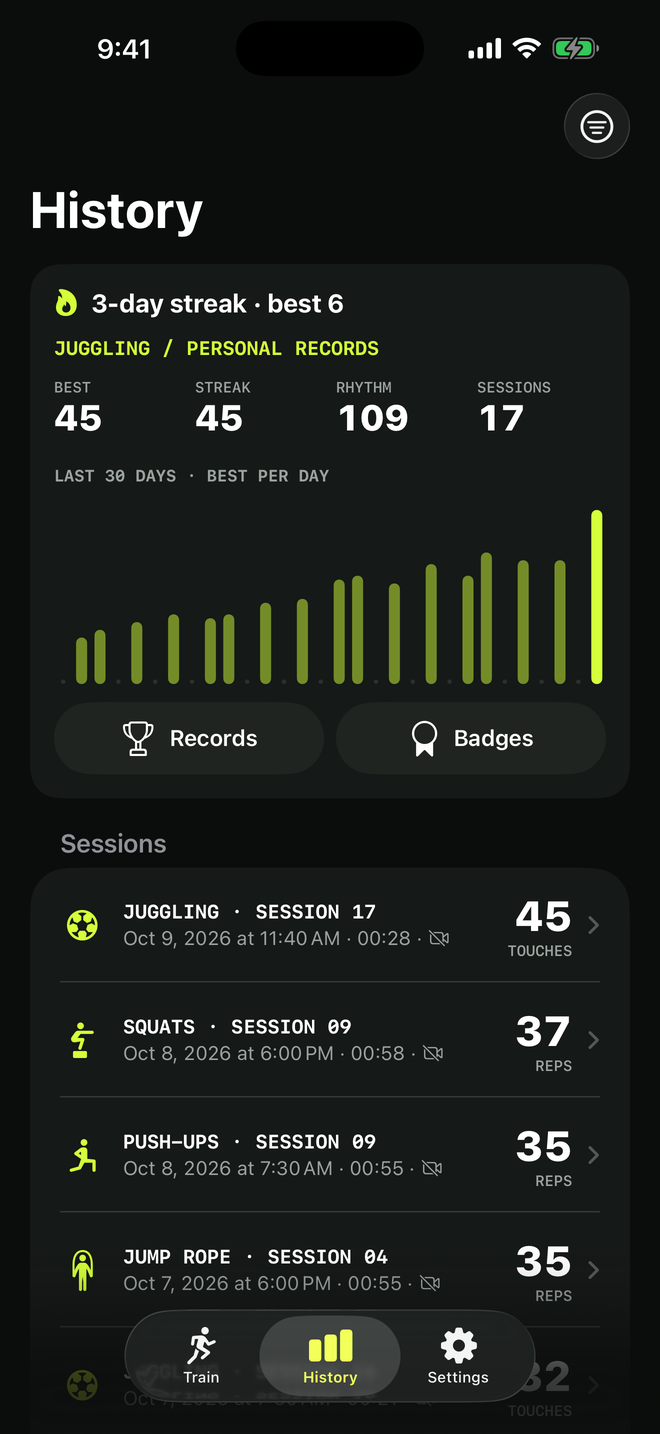
Personal bests, a chart of your best day by day, badges, streaks and a weekly goal. Challenge a friend with a code, link or QR — no server involved.
-
Share the moment
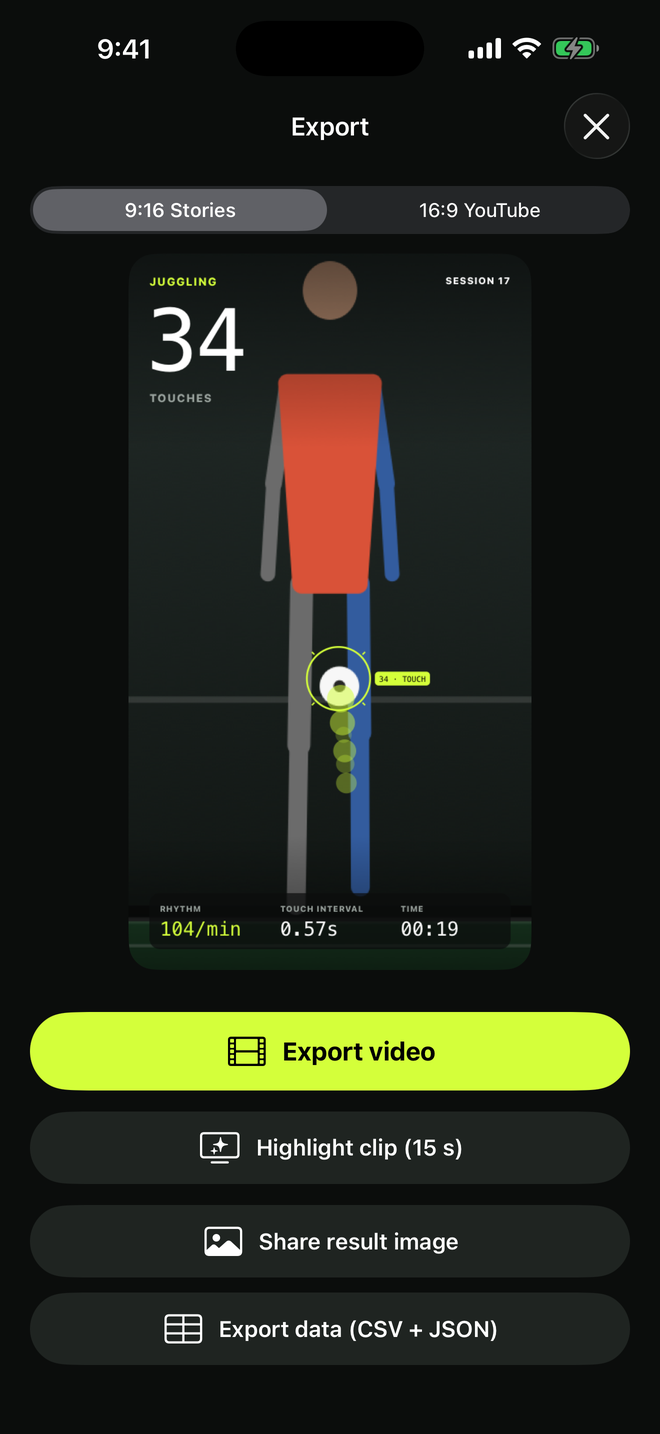
Export a result image, or with Pro a video with the count on top in 9:16 or 16:9, a 15-second highlight clip, or your data as CSV and JSON.
-
A coach’s note after every session
Apple Intelligence writes a short note on your iPhone: what went well and one thing to work on next. iPhones without it get the same kind of note from built-in rules. Want more? Ask AI shows you a short prompt with your rounded numbers, then opens ChatGPT, Claude, Gemini or another assistant you pick. In Minors mode, Ask AI needs a parent first.
A training counter, not medical advice
Counts are estimates and depend on the light, the camera angle and what’s in the frame; with Pro you can fix them in replay. Calories written to Apple Health are estimates. Train within your limits, warm up, and give yourself space away from walls, windows and roads.
How it works
Set up. Play.Review.
-
Set up
Pick a drill and prop your phone 2–3 m away, with your whole body and some space above your head in the frame.
-
Play
Press start and juggle, skip or do your reps. TouchTally counts out loud and shows your rhythm as you go.
-
Review
Replay the session in slow motion, check your records and share a video or image if you want to.
Screenshots
A closer lookat TouchTally.
Pricing
Juggling is free.Pro is your coach.
The core drills, live counting, a week of history and challenges are free. Pro adds more drills, full replay, video export and coaching.
Free
$0
- Juggling, jump rope, push-ups and squats, plus dribbling, volley, racket and shuttle drills on iPhone
- Live count, rhythm and touch interval
- Replay your latest session
- History of the last 7 days, personal bests, streaks and badges
- Challenges by code, link or QR
- Result image with a small watermark
No account and no ads.
TouchTally Pro
Every drill, every replay, every clip.
Everything in Free, plus:
- Jumping jacks and plank timer, plus shooting, vertical jump and court footwork on iPhone
- Full history, replay of every session and count editing
- Extended records and a leaderboard on your phone
- Video export with the count, in 9:16 or 16:9
- CSV and JSON export
- Coaching: form score per rep, voice cues, sets and rest, metronome, juggling patterns, highlight clips
-
Yearly 7-day free trial
Best value, billed once a year
$24.99per year
-
Monthly
Billed every month
$3.99per month
-
Lifetime
One payment, nothing renews
$49.99once
If Pro ends, nothing is deleted. Older sessions are hidden, not removed, and come back if you subscribe again.
Prices in USD; your store shows the price for your country or region. Payment is charged to your Apple ID or Google Play account. Subscriptions renew automatically unless cancelled at least 24 hours before the end of the current period, and you can manage or cancel them anytime in your store account settings. If you start the free trial, the yearly plan begins when the trial ends unless you cancel before then. Lifetime is a one-time purchase that doesn’t renew.
Privacy
Your training videostays on your phone.
-
Counted on your phone
Camera frames are analysed on the device. Videos are saved without sound and never uploaded.
-
No account
No sign-up and no password. Open the app and press start.
-
No ads, no tracking
No advertising and no tracking across other apps or websites. Anonymous usage and crash data is on by default and never includes video or exact counts. Turn it off anytime with Share anonymous usage in Settings.
-
You control the videos
Turn off saving, auto-delete after 7, 30 or 90 days, or keep videos out of iCloud backup.
AI that stays on your iPhone
The coach’s note is written on the device and never leaves it. Ask AI sends nothing by itself: you read the prompt first, it carries only rounded numbers, and it opens only the assistant you choose.
Minors mode for young players
Blurs faces, hides the Apple Health option and keeps sessions out of Spotlight. Please only film people who have agreed to it.
FAQ
Questions,answered.
Something else? Visit the help center, read the guides or email fighttech.vn@gmail.com.
How does TouchTally count touches?
Your phone’s camera watches you and the ball. TouchTally tracks your body pose with Apple’s Vision framework and follows the ball frame by frame, and counts a touch when the ball turns back up off your foot, thigh or head. Everything runs on your phone.
How should I set up my phone?
Prop it upright 2–3 m (6–10 ft) away, with your whole body and about 1 m above your head in the frame, in good light. Each drill shows its own setup tip before you start.
Which drills can it count?
Free: soccer juggling, jump rope, push-ups and squats. Pro adds jumping jacks and a plank timer. On iPhone you also get basketball, badminton, volleyball and tennis drills: dribbling, volley keep-ups, racket bounces and shuttle keep-ups (in beta) are free, and Pro adds shooting, vertical jump and court footwork. Jump rope can also be counted by the sound of the rope.
Does my video get uploaded?
No. There’s no account and no TouchTally server. Videos are saved on your phone without sound, and leave it only if you export or share them. You can turn off Save video, or delete old videos automatically.
Is the microphone recording me?
No. The microphone is used only if you count jump rope by sound. The sound is analysed live to hear the rope and is never recorded or saved.
What does TouchTally Pro add?
Jumping jacks and plank (plus shooting, vertical jump and court footwork on iPhone), your full history with replay of every session, count editing, video export with the count on top, CSV and JSON export, and coaching: form score per rep, voice cues, sets and rest, a metronome, juggling patterns and highlight clips. Yearly is $24.99 with a 7-day free trial, monthly is $3.99, or $49.99 once for lifetime.
Can kids use it?
Yes, with a parent setting it up. Minors mode blurs faces, hides the Apple Health option and keeps sessions out of Spotlight. Please only film people who have agreed to it.
How do I delete my data?
Open Settings, then Storage, and tap Delete everything. You can also delete just the videos, or set videos to delete themselves after 7, 30 or 90 days. Deleting the app removes everything.
Stop counting out loud.Start beating your best.
Download TouchTally for free. Pro starts with a 7-day free trial.