Coach's note and Ask AI: a short review after every session
How the TouchTally coach's note is written on your iPhone after each session, what happens without Apple Intelligence, and how Ask AI and Plan my week work.
Short answer
After every session, TouchTally shows a coach's note on the result screen: one line about the result, two things that went well and one thing to try next time. On iPhones where Apple Intelligence can run, the note is written on the iPhone itself. Everywhere else, the app builds the same kind of note from your numbers. If you want more, Ask AI opens another AI app with a prompt you can read and edit first.
After a session, most players want to know two things: how did that go, and what next? TouchTally puts a short answer at the top of the result screen, next to the count and the stats.
What the coach's note says
The note sits in a card titled COACH'S NOTE and always has the same three parts:
- A headline about the result, for example "New personal record: 45, up from 34."
- Two things that went well, as short bullet points.
- One thing to work on next, shown in the accent colour.
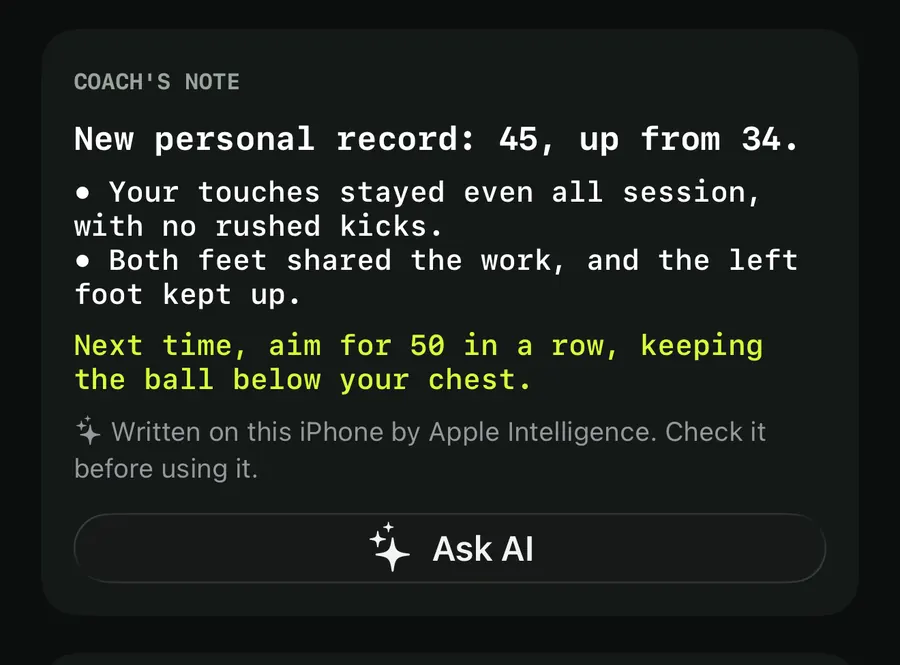
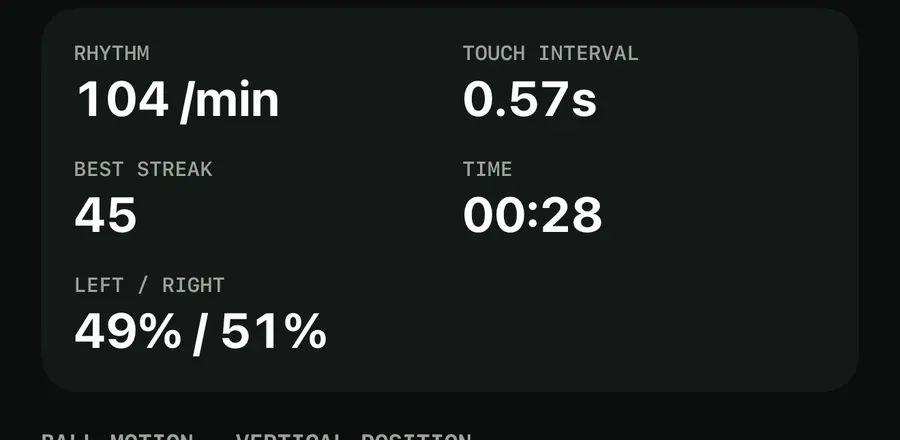
The note works from what the camera measured in that session: the count, the session length, your best streak, your rhythm and how even it was, and, depending on the drill, the share of clean reps, makes per shot, time held with good form or the left-foot share. It also compares the session with your personal best and your last session of the same drill.
Written on your iPhone, or from the numbers
There are two ways the note gets written, and the app tells you which one you are reading.
With Apple Intelligence. When Apple Intelligence can run on your iPhone, it writes the note on the device. The note then carries the line "Written on this iPhone by Apple Intelligence. Check it before using it." In Settings, TouchTally puts it this way: "The coach's note is written by Apple Intelligence on this iPhone; what goes in and comes out never leaves it." What goes in is rounded: the counts and times are put into ranges, and the date, the video and your name are not part of it. The model is told to use only those numbers and not to give health advice.
From the numbers. When Apple Intelligence can't run, TouchTally writes the note itself with fixed rules. You get headlines such as "First juggling session: 12. That's your baseline." or "38, close to your record of 41.", strengths such as "Steady rhythm at 104 per minute." or "Both feet shared the work.", and the app's next goal for that drill as the tip. This note appears straight away. When Apple Intelligence is available, you see it first for a moment, and the on-device note replaces it when it is ready.
If Apple Intelligence could work but isn't ready, a short line under the note says why, for example "Turn on Apple Intelligence in Settings to use this." or "Apple Intelligence is still getting ready. Try again later."
Ask AI: take the session to another AI app
Under the note there is an Ask AI button. It doesn't send anything when you tap it. It opens a Review prompt sheet first.
The prompt asks for a training plan for next week: which drills on which days, with sets, reps or time, and one thing to focus on each day. It includes the same rounded numbers as the note, the number of training days you aim for each week and the other drills you train. It also says that the numbers come from a phone camera app and may be a little off, and asks for a plan that is safe for a young athlete.
Send a session to an AI app
- Finish a session and scroll to the coach's note on the result screen.
- Tap Ask AI. The Review prompt sheet opens with the prompt in a text box.
- Read the prompt and change anything you like. You can add your own question or delete lines.
- Next to Send to, pick the app: ChatGPT, Claude, Gemini, Grok, Perplexity or Copilot, or copy the prompt or share it to another app.
- Tap the button at the bottom. It says exactly what happens, for example "Open in ChatGPT", or "Copy prompt & open Gemini" for apps that can't receive text from a link.
The sheet repeats the important part: "Nothing is sent until you tap the button. The app you pick has its own privacy policy, and AI answers can be wrong." TouchTally doesn't receive the conversation. The app you used last is remembered on this iPhone only and shows on the button next time. Touch and hold the button to choose a different app straight away.
Plan my week
The same idea works for the whole week. In History, tap the calendar button at the top, Plan my week. TouchTally lays out as many training days as your weekly goal, with a drill and one aim for each day, under a line such as "4 training days, from your sessions so far." You set the goal in Settings under Weekly goal, and streaks, weekly goals and badges explains how it counts.
With Apple Intelligence, the plan is written on the iPhone from your recent drills. Without it, the rules rotate through the drills you train most, each with its next goal, and a drill you haven't tried yet gets "Try it: one easy session to set a baseline." The Ask AI button at the bottom of the plan starts from your latest session. For the records and charts the plan is built from, see training history and records.
Kids and Minors mode
With Minors mode on, Ask AI asks for a grown-up first. A box titled "Ask a grown-up" asks a multiplication question, and the Review prompt sheet opens only after the right answer. The touch-and-hold menu of AI apps is left out in Minors mode, so nobody can skip that step. More on this in face blur and Minors mode.
Want a concrete target for the next session? Our guide on how to beat your juggling record pairs well with the tip in the note.
Does the coach's note send my video anywhere?
No. When Apple Intelligence writes the note, it runs on the iPhone, and what goes in and comes out stays there. The note uses rounded numbers from the session, never the video.
What if my iPhone doesn't have Apple Intelligence?
You still get a coach's note after every session. TouchTally builds it from your numbers with fixed rules: a headline about the result, two strengths and the next goal for the drill.
Does Ask AI send my data automatically?
No. Ask AI first shows the prompt in a sheet where you can read and edit it. Nothing leaves TouchTally until you tap the button that opens or copies to the app you picked.
Which AI apps can I use?
The Send to menu lists ChatGPT, Claude, Gemini, Grok, Perplexity and Copilot. You can also copy the prompt or share it to any other app.
Keep reading
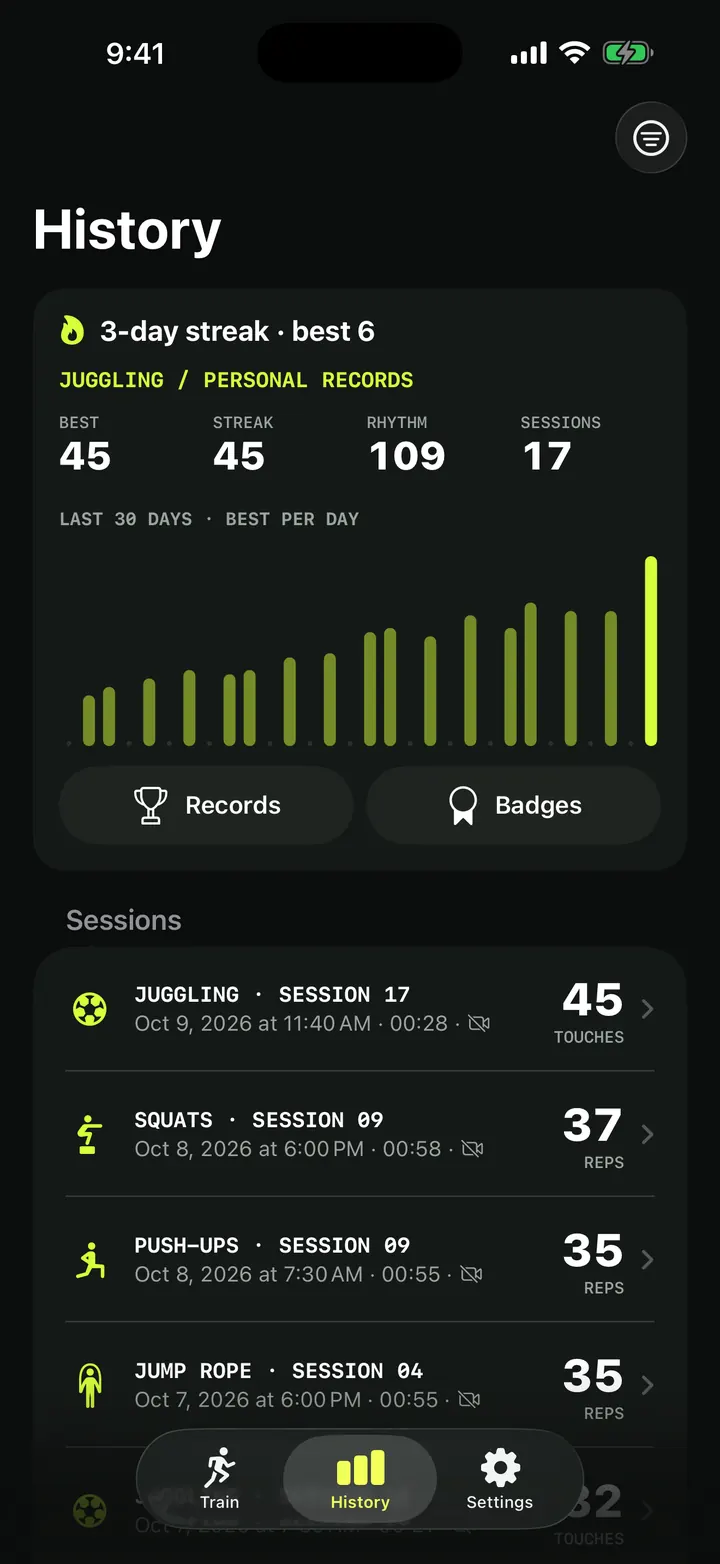
Training history and personal records: every session in one place
How TouchTally's History tab works: the streak line, personal records per drill, the 30-day best-per-day chart, filters, session list and the iPad layout.
Read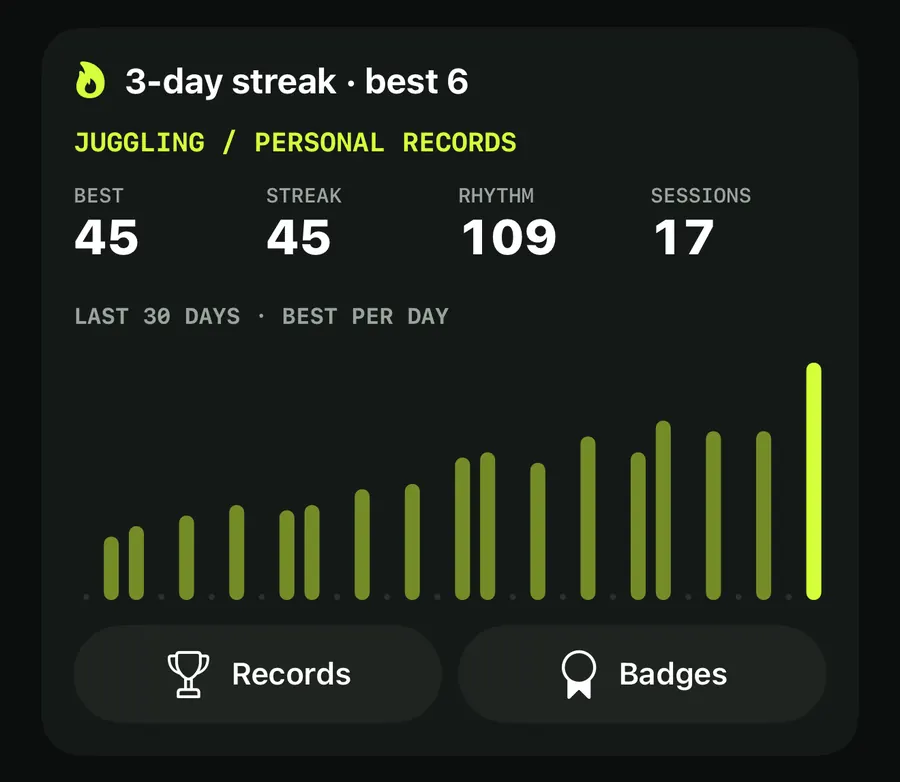
Training streaks, a weekly goal and badges that keep you coming back
How TouchTally counts day streaks with a weekly freeze day, sets a weekly training goal with reminders, awards 22 badges and puts it all in a widget.
Read
Face blur and Minors mode: filming young players with care
Minors mode in TouchTally blurs faces on screen and in Replay, pixellates them in exported videos, and asks a grown-up before anything is shared or sent.
ReadHow to beat your juggling record: rhythm, replay and records
Use TouchTally’s rhythm, touch interval, slow-motion replay, streaks and challenges to understand why a juggling run ends and how to make the next one longer.
Read guide